| Applies to | Kubernetes containers with Reason: OOMKilled or Exit Code: 137, and docker run --memory containers that exit 137 |
|---|---|
| Verified on | Kubernetes server v1.37.0 (kindest/node:v1.37.0), kind v0.33.0, containerd v2.3.4, kubectl client v1.35.3, python:3.12-alpine (Python 3.12.16), busybox:1.37, Docker Engine 29.4.0, 2026-10-29. Aurora lab runs from 2026-10-02 |
| Lab folder | scenarios/01-worker-oom, runs in runs/v0-run2/01-worker-oom; today's reproductions in runs/search-2026-10-29/fix-oomkilled-kubernetes |
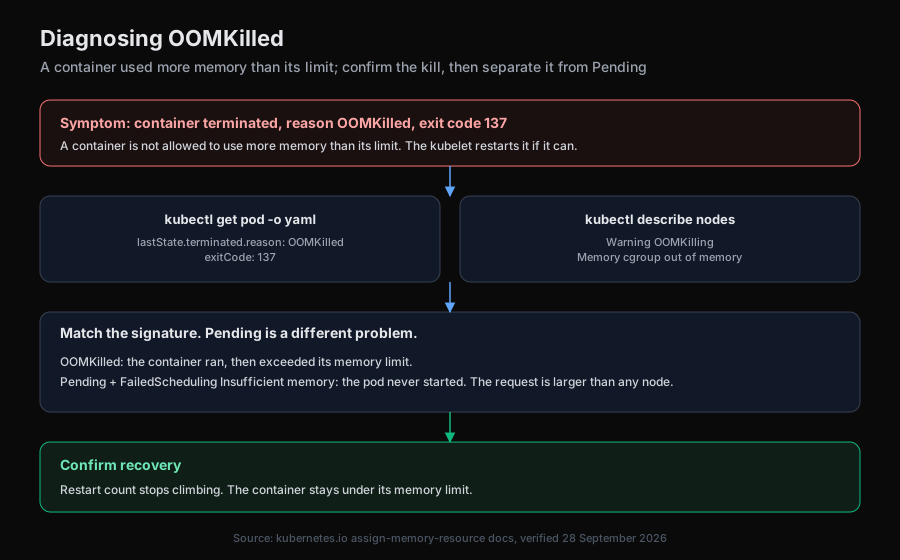
OOMKilled means the Linux kernel killed the container because it tried to use more memory than its resources.limits.memory; Kubernetes records Reason: OOMKilled and Exit Code: 137, which is 128 plus signal 9 (SIGKILL), and the kubelet restarts it, so after repeated kills the pod shows CrashLoopBackOff. Confirm it with kubectl describe pod <pod> and read Last State under each container. Exit code 137 alone does not prove an OOM kill: in our cluster a liveness probe kill and a node-pressure eviction also exited 137, with Reason: Error. The fix depends on the cause: a change that raised memory use (revert it), a limit below steady usage (raise it to measured usage), a spike (bound the work), a leak (fix the code), or a sidecar at its own limit (fix that container's limit).
At a glance
| Signal | Likely cause | Confirm with | Fix |
|---|---|---|---|
OOMKilled, 137, crashes began with a new ReplicaSet | A config or code change raised the working set | Live spec against last-applied-configuration, ReplicaSet ages | Revert the change |
OOMKilled within a second of Started, nothing changed | Limit below the steady working set | Started equals Finished; usage after a temporary raise | Raise the limit to measured usage plus headroom |
OOMKilled after the same run time, kubectl top low in every sample, last log line names one job | A spike above the limit | The killed container's last log line | Bound the job, or size the limit for the peak |
OOMKilled on a steady interval, kubectl top climbing | A leak | Two top --containers samples a minute apart | Fix the code |
READY 1/2, one container OOMKilled, the app fine | A sidecar at its own limit | Last State per container | Fix the sidecar's limit |
Reason: Error, 137, events say failed liveness probe | Not OOM: SIGKILL after the grace period | Killing and Unhealthy events | Fix the probe, handle SIGTERM |
Pod Failed, Reason: Evicted, "The node was low on resource: memory" | Node-pressure eviction, not the container limit | Pod Message, node MemoryPressure | Set memory requests near real usage, fix node capacity |
Reason: Error, 137, no probe or eviction events | Possibly an OOM kill recorded as Error | Node kernel log, or the next restart's reason | Check the kernel log before ruling OOM out |
Docker: docker inspect shows "OOMKilled":true | The same kernel kill under --memory | docker inspect <c> --format '{{json .State}}' | Raise --memory or cut usage |
What does OOMKilled mean in Kubernetes?
A container's memory limit becomes the memory limit of its cgroup. When the processes in it try to go past that number, the kernel's OOM killer ends them with SIGKILL, and the runtime reports the container as terminated with reason OOMKilled. The Kubernetes memory resources page puts it this way: "If a Container allocates more memory than its limit, the Container becomes a candidate for termination. If the Container continues to consume memory beyond its limit, the Container is terminated. If a terminated Container can be restarted, the kubelet restarts it, as with any other type of runtime failure."
Three details matter more than the definition:
- The pod phase lies. In lab run r1 the pod showed
Status: Runningwhile its only container was killed every few seconds. ReadcontainerStatuses, not the phase. - There is no swap to soften it. The kubelet's default
NoSwapbehaviour gives pods zero swap (swap docs). Inside a container on our cluster with a 192Mi limit,/sys/fs/cgroup/memory.maxread201326592andmemory.swap.maxread0. Once the kernel cannot reclaim enough page cache under the limit, the kill follows; nothing gets paged out first. - A request does not protect you from the limit. Scheduling uses the request; the kernel enforces the limit. A pod that is
PendingwithInsufficient memorywas never started and is a scheduling problem, not an OOM kill.
Is exit code 137 always OOMKilled?
No. 137 means the process died from SIGKILL. The kernel OOM killer sends SIGKILL, and so does the kubelet when a container does not stop within its grace period. We produced three different 137s on the same cluster on 2026-10-29. The reason field and the events tell them apart.
1. An OOM kill. A container that holds 150 MiB under a 128Mi limit (steady in the manifests):
    State:          Terminated
      Reason:       Error
      Exit Code:    137
      Started:      Thu, 29 Oct 2026 11:54:15 -0400
      Finished:     Thu, 29 Oct 2026 11:54:15 -0400
    Last State:     Terminated
      Reason:       OOMKilled
      Exit Code:    137
      Started:      Thu, 29 Oct 2026 11:53:50 -0400
      Finished:     Thu, 29 Oct 2026 11:53:50 -0400
    Ready:          False
    Restart Count:  3
    Limits:
      memory:  128Mi
Read that twice. The same container, same code, same allocation, killed twice 25 seconds apart: the earlier kill says OOMKilled, the later one says Error. We come back to this below.
2. A liveness probe kill. A busybox container whose liveness probe fails and which ignores SIGTERM, with terminationGracePeriodSeconds: 10 (stubborn):
    Last State:     Terminated
      Reason:       Error
      Exit Code:    137
      Started:      Thu, 29 Oct 2026 11:53:59 -0400
      Finished:     Thu, 29 Oct 2026 11:54:23 -0400
    Ready:          True
    Restart Count:  2
    Limits:
      memory:  64Mi
...
Events:
  Type     Reason     Age                From               Message
  ----     ------     ----               ----               -------
...
  Warning  Unhealthy  14s (x4 over 44s)  kubelet            spec.containers{stubborn}: Liveness probe failed: cat: can't open '/tmp/healthy': No such file or directory
  Normal   Killing    14s (x2 over 39s)  kubelet            spec.containers{stubborn}: Container stubborn failed liveness probe, will be restarted
(trimmed where marked.) The container's script traps SIGTERM and keeps looping (trap 'echo "got SIGTERM, ignoring it"' TERM in the manifest). The kubelet sent SIGTERM when the probe failed, the process ignored it, and the kubelet sent SIGKILL when the 10 second grace period ran out. Memory never came close to the 64Mi limit; the pod's cgroup memory.events on the node read oom_kill 0. Raising the memory limit here would change nothing. The probe is the problem: see liveness probe failed.
3. A node-pressure eviction. A pod with no limit and no request grows on a node under memory pressure (hog, setup in Scope below):
Status:           Failed
Reason:           Evicted
Message:          The node was low on resource: memory. Threshold quantity: 19100Mi, available: 19472552Ki. Container hog was using 566836Ki, request is 0, has larger consumption of memory.
...
    State:          Terminated
      Reason:       Error
      Exit Code:    137
...
QoS Class:                   BestEffort
The container exited 137 again, because for hard eviction thresholds "the kubelet uses a 0s grace period (immediate shutdown) for termination" (node-pressure eviction). The pod-level Reason: Evicted and its message are what identify it.
| What you see | What happened | Restarted in place? |
|---|---|---|
Container Reason: OOMKilled, 137 | Kernel killed it at its own limit | Yes, per restartPolicy |
Container Reason: Error, 137, Killing event for a probe | Kubelet SIGKILL after the grace period | Yes |
Pod Failed, Reason: Evicted, container Error, 137 | Kubelet evicted the pod for node pressure | No; the controller makes a new pod |
Container Reason: Error, 137, no probe or eviction events | Possibly an OOM kill whose reason was lost (below); check the kernel log | Yes |
When an OOM kill is recorded as Error
The Error in the first output above was not a one-off. We ran 40 one-shot pods (restartPolicy: Never, no probes), each allocating 150 MiB under a 128Mi limit, so every one of them had to be OOM killed. Two batches of 20 (tally.yaml in the run folder), listed by termination reason. The first batch:
POD        STATUS   REASON      EXIT
tally-01   Failed   OOMKilled   137
tally-02   Failed   OOMKilled   137
tally-03   Failed   OOMKilled   137
tally-04   Failed   OOMKilled   137
tally-05   Failed   Error       137
tally-06   Failed   OOMKilled   137
...
(trimmed; tally-06 to tally-20 all read OOMKilled.) The second batch had Error on tally-04 and tally-13 and OOMKilled on the other 18. All 40 exited 137, and 3 of the 40 were recorded as Error. We searched the node's kernel log (docker exec room-worker dmesg) for the container IDs of the Error pods and found a memory cgroup OOM kill for each. One of them:
oom-kill:constraint=CONSTRAINT_MEMCG,nodemask=(null),cpuset=cri-containerd-8997e1f992a5fe74d7ba0b80204d990a71e315aa8e251d17e214cf956ef646a8.scope,...
Memory cgroup out of memory: Killed process 112291 (python) total-vm:164832kB, anon-rss:131044kB, file-rss:8kB, shmem-rss:0kB, UID:0 pgtables:308kB oom_score_adj:994
(trimmed.) CONSTRAINT_MEMCG means the container hit its own cgroup limit; a node-wide kernel OOM logs a different constraint.
Do not read 3 of 40 as a rate. The conditions were poor: the kind cluster shared one Docker VM (OrbStack) with several other kind clusters, the Mac's disk was 98% full, and we ran the tally minutes after pushing another node of the same cluster into memory pressure. On a quiet host it may be much rarer. In the earlier lab runs (2026-10-01 and 10-02), all 32 OOM termination records across 13 describe pods captures read OOMKilled. What the tally shows is that it happens, on a current containerd (v2.3.4), often enough to see in 40 tries.
containerd has an issue with the same symptom: containerd issue #12260, where the CRI validation test "should terminate with exitCode 137 and reason OOMKilled" intermittently got Error in containerd's own CI. A contributor traced it to a race where the task exit updates the container status before the OOM event sets the reason; a later comment suggests systemd removes the cgroup before containerd can read the OOM data (our nodes use the systemd cgroup driver). We cannot tell which one we hit. The issue was closed by the stale bot as not planned on 2026-08-19, not as fixed.
What to do with it: an Error with 137 and no Killing or Evicted event may be an OOM kill. Read the next restart's reason, check whether the container's allocation can exceed its limit, or, with node access, grep the kernel log for the container ID.
How do you confirm OOMKilled?
Read every container's last termination, not only the first one:
kubectl get pod <pod> -n <ns> -o jsonpath='{range .status.containerStatuses[*]}{.name}{"\t"}{.lastState.terminated.reason}{"\t"}{.lastState.terminated.exitCode}{"\n"}{end}'
Then the events for the pod, which carry the probe kills and evictions:
kubectl get events -n <ns> --field-selector involvedObject.name=<pod> --sort-by=.lastTimestamp
In the lab (scenario 01, run r1, step 6 of Aurora's investigation), kubectl describe pod showed the textbook case, with an environment variable that turns out to matter:
Status:           Running
...
    State:          Terminated
      Reason:       OOMKilled
      Exit Code:    137
      Started:      Fri, 02 Oct 2026 16:26:32 +0000
      Finished:     Fri, 02 Oct 2026 16:26:32 +0000
    Last State:     Terminated
      Reason:       OOMKilled
      Exit Code:    137
      Started:      Fri, 02 Oct 2026 16:25:50 +0000
      Finished:     Fri, 02 Oct 2026 16:25:50 +0000
    Ready:          False
    Restart Count:  4
    Limits:
      memory:  192Mi
    Requests:
      cpu:     50m
      memory:  64Mi
    Environment:
      BATCH_SIZE:  2500
Started and Finished carry the same second, so the process died at startup. In run r2, a separate break of the same scenario, the worker pod read CrashLoopBackOff 4 (73s ago) in kubectl get pods: the backoff is the kubelet's restart delay, and OOMKilled is why the container keeps dying. The backoff itself is covered in how to fix CrashLoopBackOff.
Scope: is it the container's limit or the node?
Two commands answer it. First, which workloads are hurt (run r1, step 4):
kubectl get pods -n shop -o wide
NAME                        READY   STATUS      RESTARTS      AGE
api-f64486c4c-dxmf8         1/1     Running     0             75s
api-f64486c4c-w5pvs         1/1     Running     0             75s
frontend-76d98597b9-8xkmw   1/1     Running     0             75s
frontend-76d98597b9-jnq4f   1/1     Running     0             75s
loadgen-7c6676864-g44sc     1/1     Running     0             75s
redis-59458f55d8-6ft5c      1/1     Running     0             75s
worker-86f68b9bf6-hgxwz     0/1     OOMKilled   3 (50s ago)   67s
(IP, node and gate columns trimmed.)
Second, the nodes (run r2, step 11):
kubectl top nodes
NAME                       CPU(cores)   CPU(%)   MEMORY(bytes)   MEMORY(%)
aurora-lab-control-plane   96m          0%       727Mi           3%
aurora-lab-worker          21m          0%       159Mi           0%
aurora-lab-worker2         32m          0%       198Mi           0%
One workload and idle nodes: the container's own limit. Node pressure looks completely different. To reproduce it we set the kubelet on one worker to evictionHard: memory.available: 19100Mi on a node with about 19.55 GiB, so pressure starts near 900 MiB of node usage (the default Linux threshold is memory.available<100Mi, per the eviction docs). The kind node's stock kubelet config set evictionHard only for disk, so we had to add the memory line. That is worth checking on your own nodes: the docs say that if you change any hard threshold, the others "will not be inherited as the default values and will be set to zero" unless MergeDefaultEvictionSettings is true. Then a BestEffort pod grew by 50 MiB every 3 seconds next to a Guaranteed pod holding 40 MiB of its 64Mi:
kubectl describe node room-worker2
  MemoryPressure   True    Thu, 29 Oct 2026 11:57:48 -0400   Thu, 29 Oct 2026 11:57:48 -0400   KubeletHasInsufficientMemory   kubelet has insufficient memory available
...
Taints:             node.kubernetes.io/memory-pressure:NoSchedule
kubectl get events -A --field-selector involvedObject.kind=Node --sort-by=.lastTimestamp
default     11s         Warning   EvictionThresholdMet        node/room-worker2         Attempting to reclaim memory
default     4s          Normal    NodeHasInsufficientMemory   node/room-worker2         Node room-worker2 status is now: NodeHasInsufficientMemory
The BestEffort pod was evicted (the output in the previous section). The Deployment then created replacements on the same node (it was pinned there), and the kubelet rejected eight of them within a second:
Status:           Failed
Reason:           Evicted
Message:          Pod was rejected: The node had condition: [MemoryPressure].
The next one was not scheduled at all: 0/3 nodes are available: 1 node(s) didn't match Pod's node affinity/selector, 2 node(s) had untolerated taint(s). The Guaranteed pod stayed 1/1 Running with 0 restarts throughout. That matches the documented order: pods whose usage exceeds their requests go first, Guaranteed pods and pods under their requests last.
If the kernel runs out of memory before the kubelet can evict, the kernel OOM killer picks by oom_score_adj: -997 for Guaranteed, 1000 for BestEffort, in between for Burstable by request size (node out of memory behavior). We did not reproduce that case, so we cannot show what reason Kubernetes recorded for it. The signs to look for are a container killed well below its own limit on a node that is short of memory, and a kernel log line whose constraint is not CONSTRAINT_MEMCG (a node-wide OOM typically logs CONSTRAINT_NONE).
Which cause is it?
Go in this order. Each step is cheaper than the next and rules out the cause that most changes the fix.
1. Did something change? (the lab case)
The crashes in scenario 01 began with a new ReplicaSet (run r2, step 12):
NAME                DESIRED   CURRENT   READY   AGE
worker-6cf88d4b58   0         0         0       3m46s
worker-86f68b9bf6   1         1         0       3m39s
The Deployment's live spec against its last-applied-configuration annotation (run r1, step 7):
metadata:
  annotations:
    deployment.kubernetes.io/revision: "2"
    kubectl.kubernetes.io/last-applied-configuration: |
      {"apiVersion":"apps/v1","kind":"Deployment",...,"env":[{"name":"BATCH_SIZE","value":"500"}],...}
...
        env:
        - name: BATCH_SIZE
          value: "2500"
        image: python:3.12-alpine
        resources:
          limits:
            memory: 192Mi
Live 2500, last applied 500: someone ran kubectl set env outside the manifest. The worker's code (run r1, step 10) allocates about 100 KiB per item:
batch = int(os.environ.get("BATCH_SIZE", "500"))
print(f"worker started, batch size {batch}", flush=True)
while True:
    # Each queued item holds about 100 KiB while the batch is processed.
    buf = [bytearray(100 * 1024) for _ in range(batch)]
2500 items is about 244 MiB against 192Mi; 500 is about 49 MiB. The limit was right and the change was wrong. That annotation diff is the most useful single read in an OOMKilled investigation, because it gives you the cause and the rollback together.
2. Is the limit below steady usage?
No change, and the container dies the moment it loads its data. Our steady container holds a 150 MiB cache under a 128Mi limit: Started equals Finished on every kill, and kubectl top never shows it because it never lives long enough to be sampled. The only way to get the number is to give it room once and measure. After raising the limit to 192Mi:
kubectl -n oom top pod --containers -l app=steady
POD                       NAME     CPU(cores)   MEMORY(bytes)
steady-6856dfbd78-7jq6t   steady   6m           153Mi
153Mi is the real working set, 80% of the new limit. Now the limit has a number behind it.
3. Is it a spike?
The container runs normally for a while, then dies at the same point each cycle. Our spiky container idles, and every 40 seconds builds a 200 MiB report under a 128Mi limit:
    Last State:     Terminated
      Reason:       OOMKilled
      Exit Code:    137
      Started:      Thu, 29 Oct 2026 11:53:36 -0400
      Finished:     Thu, 29 Oct 2026 11:54:16 -0400
Six kubectl top pod --containers samples 15 seconds apart:
15:54:46Z
spiky-7cb5877b97-s6bjg      spiky      9m           12Mi
15:55:01Z
spiky-7cb5877b97-s6bjg   spiky   0m           12Mi
15:55:46Z
spiky-7cb5877b97-s6bjg      spiky      3m           11Mi
15:56:01Z
spiky-7cb5877b97-s6bjg   spiky   0m           11Mi
(trimmed to the samples that included this pod.) 11 to 12Mi in every sample, for a container killed at 128Mi. Dashboards built on these samples will tell you this container uses a tenth of its limit. The evidence is in the log of the container that died. While the pod waits in backoff, plain kubectl logs returns it:
kubectl -n oom logs spiky-7cb5877b97-s6bjg
worker up
report 1: building 200 MiB buffer
The last line before death names the job. --previous gave unable to retrieve container logs for the container before it, as it did in lab run r1, so read the current one first. Why is in CrashLoopBackOff by exit code.
A spike and a leak both kill on a steady interval. The difference is the shape: a leak's samples climb between kills, a spike's stay flat.
4. Which container?
describe pod lists state per container. If the dead one is a log shipper or proxy and the app is fine, the pod drops out of its Service while the app logs look healthy: sidecar container OOMKilled.
Docker exit code 137
The same kernel kill happens under docker run --memory, and Docker records it in the container state:
docker run --name fix-oomkilled-kubernetes-a --memory 128m --memory-swap 128m python:3.12-alpine python -c 'b = b"\x01" * (200 << 20); print("allocated")'
echo "exit=$?"
docker inspect fix-oomkilled-kubernetes-a --format '{{json .State}}'
exit=137
{"Status":"exited","Running":false,"Paused":false,"Restarting":false,"OOMKilled":true,"Dead":false,"Pid":0,"ExitCode":137,"Error":"","StartedAt":"2026-10-29T15:56:22.569618306Z","FinishedAt":"2026-10-29T15:56:22.758797505Z"}
Two things differ from Kubernetes. Without --memory-swap, the same allocation succeeded and printed allocated 200 MiB under a 128m limit with exit 0, because "the container can use as much swap as the --memory setting, if the host has swap memory configured" (Docker resource constraints); docker inspect showed memoryswap=268435456. A test that passes in Docker with swap can be OOM killed in a pod with none. And docker stop on a process that ignores SIGTERM exits 137 too, after the 10 second default grace period:
docker stop fix-oomkilled-kubernetes-c  0.01s user 0.01s system 0% cpu 10.170 total
{"Status":"exited",...,"OOMKilled":false,"Dead":false,"Pid":0,"ExitCode":137,...}
(docker inspect output trimmed.) The log showed got SIGTERM, ignoring it, as in the pod.
In Docker, "OOMKilled":true is the proof, as Reason: OOMKilled is in Kubernetes.
Fix: what to change for each cause
Keep mitigation and the real fix apart. A higher limit stops the kills today; it is the fix only when the larger working set is a real requirement.
- A change raised usage (the lab case). Revert it with the verb that made it:
kubectl -n shop set env deploy/worker BATCH_SIZE=500, or re-apply the tracked manifest, which also removes the drift. Risk: one more rollout; the single replica was already down. Rollback: set it back to 2500. - Limit below steady usage. Set the limit to the measured working set plus headroom:
kubectl -n <ns> set resources deploy/<name> -c <container> --requests=memory=<n>Mi --limits=memory=<n>Mi, then put the same values in the manifest so the next apply does not undo it. Risk: a rollout, and a larger request may not fit on any node (Pending). Rollback: re-apply the previous manifest. - A spike. Bound the job: process the report in chunks, stream it, or cap the batch. If the peak is legitimate, size the limit for the peak and leave the request at typical usage. Do not average the peak away with a limit sized from
kubectl top; the samples above never saw it. - A leak. Fix or revert the code. A higher limit only lengthens each cycle: OOMKilled from a slow memory leak.
- Not OOM: liveness probe kill. Fix the probe, and make the process exit on SIGTERM so the kill is not needed: liveness probe failed.
- Node-pressure eviction. Give every pod a memory request close to its real usage, so the scheduler stops overcommitting the node, and give pods that must survive equal requests and limits (Guaranteed). Then fix the node's capacity or the pod that grew without a limit. Removing the eviction threshold is not a fix: the kernel OOM killer then chooses for you.
Do not revert and raise the limit in one change. You will not know which one stopped the kills.
Verify: what counts as fixed?
The restart count stops moving for longer than two of the old cycles, and the last termination reason stops being OOMKilled. For the lab worker the batch cycle is 5 seconds, so watch at least a minute; for a spike every 40 seconds, several minutes. The lab's own "still broken" check, inverted:
kubectl -n shop get pods -l app=worker -o jsonpath='{.items[*].status.containerStatuses[0].lastState.terminated.reason}'
While broken it prints OOMKilled; after the fix the new pod has no terminated state and it prints nothing. It reads only the first container, so use the per-container command from Confirm on multi-container pods. Then check headroom with kubectl top pod --containers: our fixed steady read 153Mi of 192Mi. For an eviction, the node condition MemoryPressure must read False and new pods must start on it.
Prevent: an alert that does not trust the reason alone
With kube-state-metrics, alert on the reason, and separately on 137 with restarts, to catch kills recorded as Error. The reason series stays at 1 until the container terminates again, so tie it to recent restarts:
kube_pod_container_status_last_terminated_reason{reason="OOMKilled"} == 1
  and on (namespace, pod, container)
increase(kube_pod_container_status_restarts_total[15m]) > 0

increase(kube_pod_container_status_restarts_total[15m]) > 0
  and on (namespace, pod, container)
kube_pod_container_status_last_terminated_exitcode == 137

kube_pod_status_reason{reason="Evicted"} == 1
The metric names, labels and the Evicted reason value are from the kube-state-metrics pod metrics reference (the first two are marked experimental there). We did not run these queries against a Prometheus in this lab; the second one also fires on probe kills, which you want to see anyway.
Guardrails:
- Treat a diff between the live spec and
last-applied-configurationas a finding. GitOps tools show it as OutOfSync; without one, a scheduledkubectl diffagainst the repo does the same. - Write the memory math next to the knob. A comment on
BATCH_SIZEsaying "100 KiB per item, limit 192Mi, keep under 1800" would have stopped the lab change in review. The 5 whys for this scenario traces the lab change back to nothing tying batch size to the memory limit. - Give every limit a measured number and a date. A limit nobody can explain gets raised blindly the next time this fires.
Common mistakes
- Reading 137 as OOM. Two of the three kinds of 137 we produced were not OOM kills. And the reverse: on a loaded test host, 3 of 40 forced OOM kills were recorded as
Error. Read the reason, the events, and when they disagree, the kernel log. - Raising the limit first. In the lab the change was the bug; 320Mi would have hidden it until the next increase.
- Sizing the limit from
kubectl top. A spike or a startup allocation never shows in the samples. - Blaming the node. An evicted pod says
Evictedwith a node message, and the node showsMemoryPressure. A containerOOMKilledat its limit on an idle node is the container. - Reading only
containerStatuses[0]. The killed container may be the sidecar.
What we saw in the lab
Aurora has been run on four memory scenarios in the Aurora lab, two runs each, every verdict checked by a person (benchmark, benchmark/results.json):
| Scenario | Aurora verdicts | What it was |
|---|---|---|
| 01-worker-oom | correct, correct | This page's lab case |
| 02-sidecar-oom | correct, correct | Sidecar at its own limit |
| 17-slow-memory-leak | correct, correct | Leak |
| 12-two-faults-oom-and-selector | partial, partial | Found the OOM both times, missed a second, unalerted fault |
On scenario 01 Aurora got only the alert text, KubePodCrashLooping: pod worker in namespace shop is restarting repeatedly, and read-only kubectl under its default observability_only policy. Model bedrock/us.anthropic.claude-sonnet-5, Aurora commit 87d22baf. Run r1 took 91 s and 12 tool calls ($0.25), r2 228 s and 14 ($0.35). Both named the OOM kill and the BATCH_SIZE change from 500 to 2500, and neither claimed a leak or node pressure, the two wrong answers the scenario lists. r1 got there through the annotation diff: "the live spec sets BATCH_SIZE=2500, while the kubectl.kubernetes.io/last-applied-configuration annotation ... shows BATCH_SIZE=500, indicating an out-of-band change". r2 read the previous log first and did the arithmetic: "BATCH_SIZE=2500 requires ~244MiB while the container's memory limit is 192Mi".
What went wrong:
kubectl rollout historywas denied in both runs with "Command blocked by organization policy: Mutating kubectl operations". The command is read-only; the default deny rule matched the wholerolloutverb. Aurora diffed the ReplicaSets and the annotation instead and listed the blocked call under "Not checked". The rule has been narrowed on a lab branch torollout restart|undo|pause|resume(REPORT.md).- Neither report put the fix in the root cause. Both runs proposed reverting
BATCH_SIZEto 500, and both also offered 320Mi with the reason stated, in the separate "Suggested Next Steps" list that the first grader did not read.
The cases added on 2026-10-29 (the steady limit, the spike, the probe kill, the eviction, the Error recorded for real OOM kills) are reproductions on our own kind cluster. Aurora has not been run on them yet, so we do not know whether it would read an Error with 137 as an OOM kill or check the node for an eviction. That is the next thing we will test. For comparison, on scenario 01 HolmesGPT was correct in both of its runs (39 s and 28 s) and K8sGPT was partial in both; those grades are from a judge model with a second model review and a blinded regrade, not read by a person.
How Aurora handles this
Aurora receives the alert and investigates with read-only kubectl behind an allowlist, so by default it cannot change the cluster while it looks. For OOMKilled it reads the container state, the events, the Deployment spec against its last-applied-configuration annotation, the code or config that sets the working set, and node and pod metrics, then writes a root cause with a citation for each claim and a separate list of suggested fixes. Anything it could not verify goes in a "Not checked" section. The full traces for both lab runs are in the lab repository.
- Start free: aurora-ai.net (hosted, no infrastructure to run)
- GitHub: github.com/Arvo-AI/aurora
- Book a demo: cal.com/arvo-ai/demo
Related: OOMKilled from a slow memory leak, sidecar container OOMKilled, liveness probe failed, Pending with FailedScheduling, paste your kubectl output into the pod diagnoser, and the root cause analysis guide for SREs.
Sources and verification
- Lab case: every scenario 01 output is from Aurora's recorded tool calls in runs/v0-run2/01-worker-oom (
steps-full.json,aurora-rca.md,grade.json,result.json), run 2026-10-02 on kind v0.33.0 and Kubernetes v1.37.0. Scenario 01 was re-broken with./lab.sh selftest 01-worker-oomon 2026-10-29 and still reproduces. - Today's cases: manifests,
describeoutput,topsamples, the 40-pod tally, kernel log lines and versions are in runs/search-2026-10-29/fix-oomkilled-kubernetes. Output is trimmed where marked, otherwise unchanged. Times indescribeoutput are US Eastern because that is where kubectl ran. - Kubernetes behaviour: Assign Memory Resources, Node-pressure Eviction (0 s grace for hard thresholds, eviction order, default thresholds,
oom_score_adj), Swap memory management, liveness probes, checked 2026-10-29. - Docker: resource constraints and docker stop, checked 2026-10-29.
- The OOM reason race: containerd issue #12260, checked 2026-10-29.
- Metrics: kube-state-metrics pod metrics, checked 2026-10-29.